Importing CAD Models for Assemblies
Including fasteners into a CAD model has a few more considerations than most other categories of vendor parts.
Firstly, the part count for fasteners will generally be much higher than other vendor parts like motors or pneumatic components. With the exceptions of things like pneumatic fittings or sensors, few things are patterned exhaustively like fasteners can be. Those few components that are, usually require fasteners of their own for mounting anyway.
Secondly, the data consumption and file size of fully detailed hardware models vastly exceed their functional contributions to a CAD assembly. Ultimately, fasteners are included more for inventory purposes than to convey actionable information about a design. We can’t justify them representing most of the data for a particular assembly. In order to maintain an efficient workflow, we need to consider the cost in CAD station memory and PDM server bandwidth consumed by each component of a CAD design. Certain considerations have to be made for assembly efficiency, or even a fairly robust CAD station can become overwhelmed with even moderate part counts.
What’s a Screw Without Threads?
This course won’t be delving too deep into 3D modeling theory, but we will gleam over some basics to demonstrate the importance of saving a vendor model in your PDM system the correct way:
- All 3D shapes in CAD are made up of flat three or four-sided polygons
- Flatter objects are made of less polygons
- Curvier objects are made of more polygons
- The file size is directly correlated to polygon count
- The curviest of curves is the helix
- Screw threads are a helix
Following this logic, you should conclude that threaded fasteners can contain a tremendous amount of data for their size. We now have to decide if it’s worth that data to include threads in the model.
The correct decision is no. Threads contribute very little, if anything, to a 3D model in terms of conveying design intent, and just aren’t worth the increased loading time and sluggish CAD station behavior.
Most vendors will go ahead and make the decision for you and only distribute defeatured CAD models. That is, 3D models with the extraneous features removed. Less often, you will have a choice when selecting which file format to download.
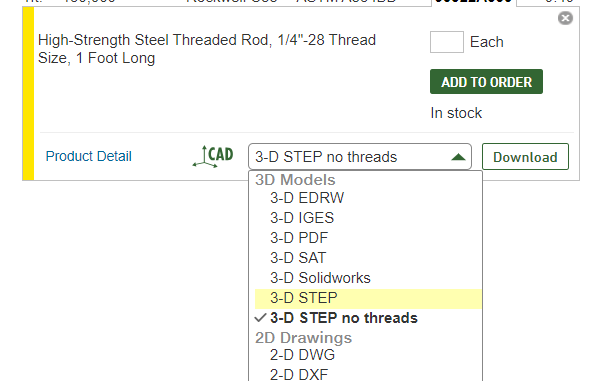
Here is the product page for a generic 1/4-28 threaded rod. We see that not only can we select the file format to download, but we even have two options for STEP format, one with and one without threads. You may feel the knee-jerk reaction to get the one that conveys the most information. Let’s see just how different those two files are:

Once downloaded, the difference is clear: the fully detailed model is 450 times larger than the defeatured model.
There are rarely, if ever, times where it makes sense to use fully detailed CAD models of threaded fastener in assembly models.